
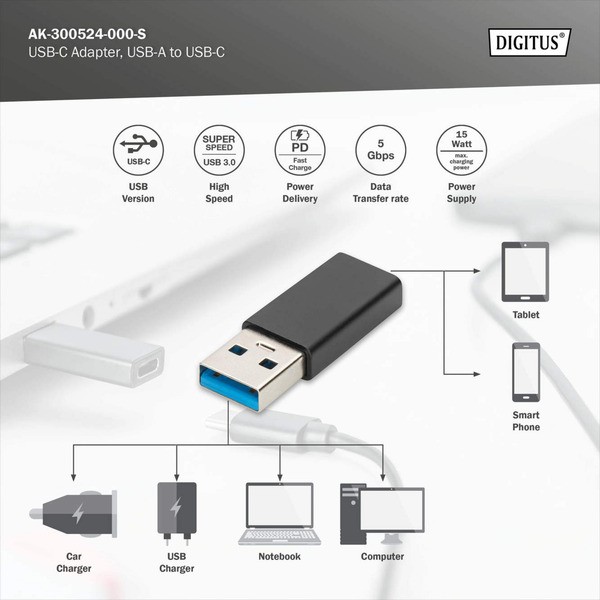


USB Type-C Adapter, USB A - USB-C
The DIGITUS USB Type A to USB-C adapter allows USB Type-C devices to be used on an older USB A port. The adapter supports the USB 3.0 specification with data transfers of up to 5Gb...
Please Note
The website is currently being actively developed, you are welcome to place the order and in 99% of the cases your order will be processed as usual, but in some cases there may be a delay or the price may change. We will notify you if there are any issues.
Discontinued
This item was discontinued and currently is not available for order on our website. The item may become available soon. Please contact us if you need more information regarding the upcoming arrivals.
The DIGITUS USB Type A to USB-C adapter allows USB Type-C devices to be used on an older USB A port. The adapter supports the USB 3.0 specification with data transfers of up to 5Gbps and provides a maximum power of 15W (3A). By simply flipping the USB-C connector, you can switch between USB 3.0 and USB 2.0 speeds, provided they are supported by the USB A port. The integrated 56k pull-up resistor protects the devices from damage caused by overload and only supplies as much power as the connected USB-C device needs.
| Typ | Adapter |
| EAN | 4016032467410 |
| Manufacturer no. | AK-300524-000-S |
| Connection - from | 1x USB-C (socket) |
| Warnings and safety information | Safety instructions: When plugging and unplugging the cable, only hold it by the plug and do not pull directly on the cable. Cables should not be sharply kinked or bent at tight angles as this may damage the internal wires and cause failure. Make sure that the cables are not under tensile stress, as this can damage the insulation and wires inside the cable. Ensure that cables are not routed in areas where they can easily be mechanically damaged. Cables should not be used in extremely high or very low temperature environments. Pay attention to the product information regarding the maximum operating temperature of the cable Check cables regularly for visible damage such as cracks, kinks or signs of wear. Defective cables should be replaced immediately to avoid failures, short circuits or even electric shock. |